MesoLive Agent Setup - CLI
The MesoLive Agent CLI is the headless version of MesoLive-Agent.
It is typically used on servers (Linux or Windows), or environments where the App Stores are not available. It is a low-resource command-line application that can run on any OS with Docker support.
Requirements
- Docker Desktop
- A valid Agent Key from the Agents page
- At least one enabled integration:
- IBKR TWS (host + port + client id), and/or
- TastyTrade (client secret + refresh token)
Create an Agent Key
- Open the MesoLive Agents page
- Click New Agent Key
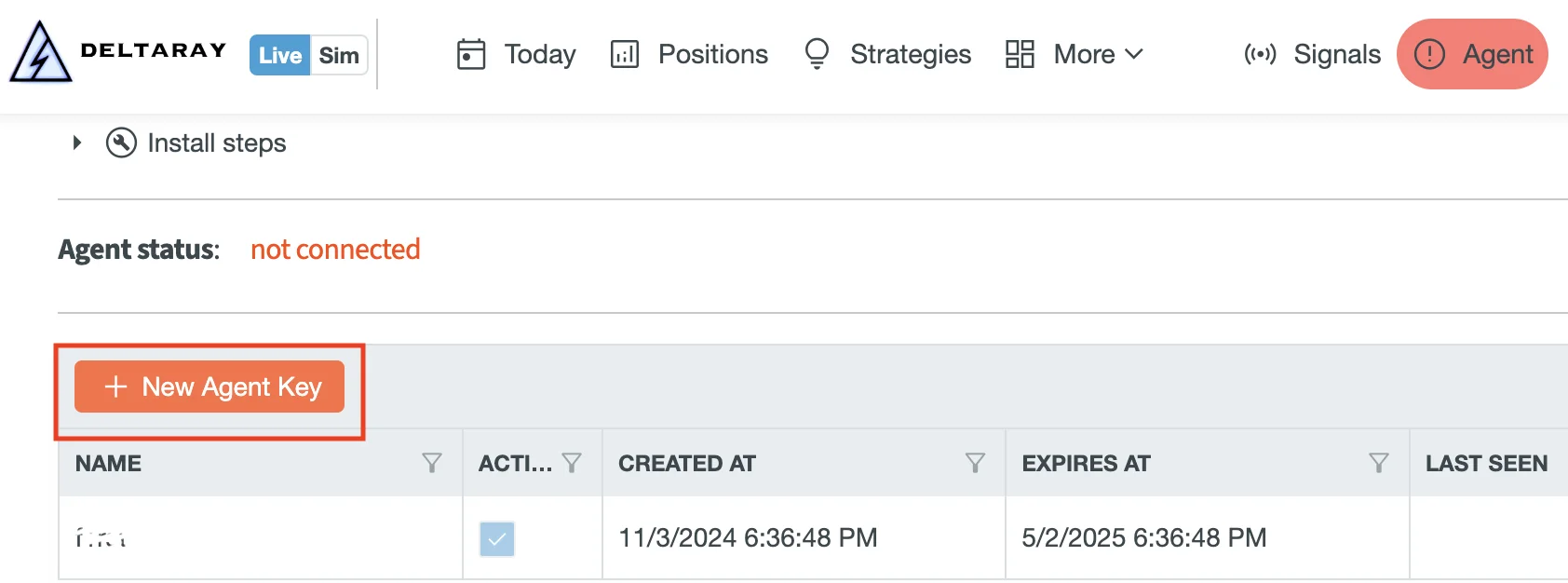
- Copy and save the key value (it is shown once) in a safe place.
Important
Treat Agent Keys like passwords. If a key expires or is revoked, generate a new one and update the Agent configuration.
License acceptance
You must accept the Terms and Conditions:
- Pass
--accept-licensecommand line parameter, or - Set
ACCEPT_LICENSE=yesenvironment variable.
In Docker, using the env var is recommended:
docker run -it --name mesolive-agent -e ACCEPT_LICENSE=yes deltarayio/mesolive-agent:VERSION -- --help
CLI options
IBKR / TWS
--tws-host: TWS host name or IP (example:host.docker.internal)--tws-port: TWS API port (typically7496live,7497paper)--tws-client-id: TWS client id (must be unique per TWS API client)--no-tws: disable TWS even if env vars are set
- macOS/Windows: use
host.docker.internalfor TWS Host. - Linux:
host.docker.internalmay not exist.- Option A (recommended): add
--add-host=host.docker.internal:host-gateway(Docker 20.10+). - Option B: use your host’s LAN IP address.
- Option C: use
--network host(only if it fits your security model).
- Option A (recommended): add
TastyTrade
--tasty-client-secret: OAuth client secret--tasty-refresh-token: OAuth refresh token--no-tasty: disable TastyTrade even if env vars are set
MesoLive
--agent-key: the Agent Key JWT (treat it like a password)--accept-license: accept the Terms and Conditions for this run
Logging
--verbose: debug logging--trace: trace logging (most verbose)
Environment variables
The CLI supports env var configuration. CLI flags override env vars when both are present.
| Variable | Meaning |
|---|---|
MESOLIVE_AGENT_KEY | Agent Key (JWT) |
MESOLIVE_BASE_URL | Advanced: override Portal base URL (default: https://mesolive.io; change only if instructed by support) |
MESOLIVE_TWS_HOST | TWS host |
MESOLIVE_TWS_PORT | TWS port |
MESOLIVE_TWS_CLIENT_ID | TWS client id |
MESOLIVE_TASTY_CLIENT_SECRET | TastyTrade OAuth client secret |
MESOLIVE_TASTY_REFRESH_TOKEN | TastyTrade OAuth refresh token |
ACCEPT_LICENSE | Must be set to yes to accept Terms and Conditions |
Docker examples
Avoid placing secrets (Agent Key, refresh token) directly on the command line in production. They can leak via shell history and can be visible via process inspection. If this is a shared machine, avoid using account credentials directly in terminal history.
IBKR / TWS only
docker run -it --name mesolive-agent \
  -e ACCEPT_LICENSE=yes \
  -e MESOLIVE_AGENT_KEY=eyJra...R4GA \
  -e MESOLIVE_TWS_HOST=host.docker.internal \
  -e MESOLIVE_TWS_PORT=7496 \
  -e MESOLIVE_TWS_CLIENT_ID=132 \
  deltarayio/mesolive-agent:VERSION
TastyTrade only
docker run -it --name mesolive-agent \
  -e ACCEPT_LICENSE=yes \
  -e MESOLIVE_AGENT_KEY=eyJra...R4GA \
  -e MESOLIVE_TASTY_CLIENT_SECRET=123456 \
  -e MESOLIVE_TASTY_REFRESH_TOKEN=eyJ... \
  deltarayio/mesolive-agent:VERSION
IBKR + TastyTrade
docker run -it --name mesolive-agent \
  -e ACCEPT_LICENSE=yes \
  -e MESOLIVE_AGENT_KEY=eyJra...R4GA \
  -e MESOLIVE_TWS_HOST=host.docker.internal \
  -e MESOLIVE_TWS_PORT=7496 \
  -e MESOLIVE_TWS_CLIENT_ID=132 \
  -e MESOLIVE_TASTY_CLIENT_SECRET=123456 \
  -e MESOLIVE_TASTY_REFRESH_TOKEN=eyJ... \
  deltarayio/mesolive-agent:VERSION
Running it as a service
Use one docker run command with the -d flag to create a long-running service.
--restart unless-stopped makes it come back after reboot.
docker run -d --restart unless-stopped --name mesolive-agent \
  -e ACCEPT_LICENSE=yes \
  -e MESOLIVE_AGENT_KEY=eyJra...R4GA \
  -e MESOLIVE_TWS_HOST=host.docker.internal \
  -e MESOLIVE_TWS_PORT=7496 \
  -e MESOLIVE_TWS_CLIENT_ID=132 \
  deltarayio/mesolive-agent:VERSION
Basic service commands
docker logs mesolive-agent
docker restart mesolive-agent
docker stop mesolive-agent
docker start mesolive-agent
Optional debug logging:
docker run ... deltarayio/mesolive-agent:VERSION -- --verbose
Upgrading
Docker Container are not updating automatically. To see the available versions, check the Docker Hub repository.
Upgrade steps:
- Identify latest version tag from Docker Hub
docker pull deltarayio/mesolive-agent:NEW_VERSIONdocker stop mesolive-agentdocker rm mesolive-agent- Re-run the same
docker run -d ...command, replacing the image tag docker logs mesolive-agent
If the Agent suddenly can’t connect after a service update, upgrading is the first thing to try: MesoLive may enforce a minimum Agent version for protocol compatibility.
Troubleshooting
- “Terms and Conditions were not accepted”: set
ACCEPT_LICENSE=yesor pass--accept-license. - “Neither TWS nor TastyTrade is configured”: provide TWS and/or Tasty settings (flags or env vars).
- TWS connection issues:
- Confirm TWS is running and API access is enabled (see Interactive Brokers).
- Confirm the port matches TWS settings (7496/7497 by default).
- Ensure
--tws-client-idis unique (conflicts can prevent connection). - If Docker can’t reach your host-local TWS, see “Docker → host TWS networking notes” above.
For a deeper symptom → cause → fix playbook, see: Troubleshooting → Agent.