Monitor Accounts
Video tutorial
Accounts page
The Accounts page provides account-level monitoring for cash/NAV and portfolio counts across all connected live and paper accounts. Functionalities:
- Monitor Cash and NAV per account
- Compare accounts over time in the Account NAVs graph
- See how many active strategies and open positions each account currently has
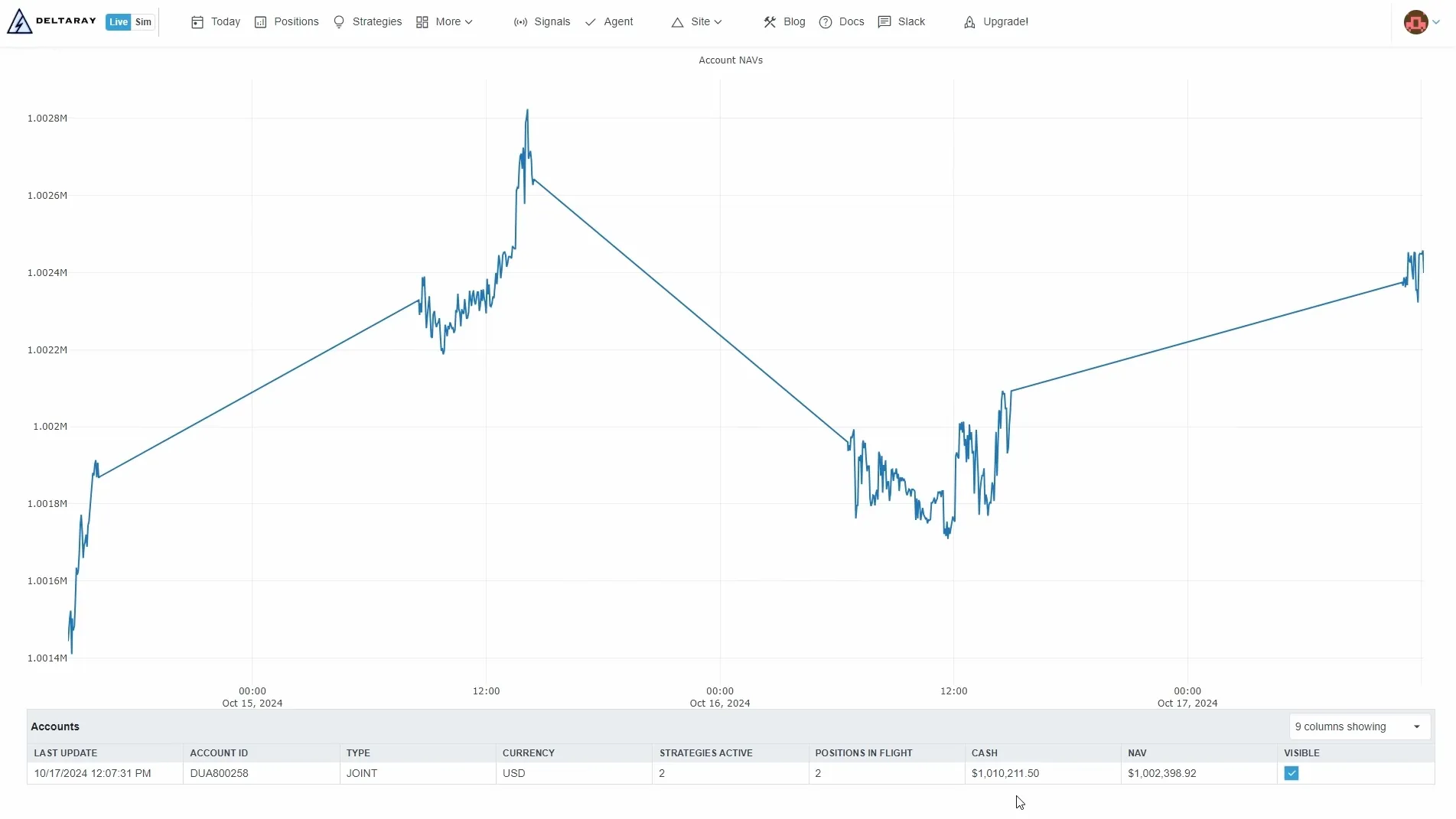
Page layout
Account NAVs graph
- A line series per account showing NAV over time.
- Use the Visible checkbox in the grid to include/exclude an account from the graph.
- For long histories, the chart may be downsampled for performance.
Accounts grid
- Last update: timestamp of the latest summary received for that account
- Account ID: broker account identifier
- Type / Currency
- Strategies active: count of strategies that currently have positions in this account
- Positions in flight: count of open positions
- Cash and NAV
- Visible: whether the account is shown in the NAV graph
Troubleshooting
- If an account shows an old Last update:
- Verify the Agent is connected: Troubleshooting → Agent
- Check for errors/audit trail: Troubleshooting → Events
- If NAV/greeks/quotes look stale, validate market data in: Data Explorer